The before and after reel format
A before-and-after reel shows something in one state, makes a turn, and reveals it in a better state. Before, turn, after. People love watching the change, and it is also the format where honesty matters most. Only show results you can back up.
Structure: The before, the turn, the after. Only real results; no claims we cannot back up. Hook: Show the before for one second, then cut.
Viral examples of this format
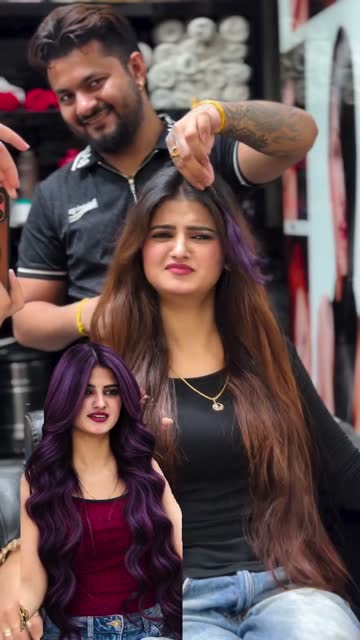

A before-and-after reel shows something in one state, makes a turn, and reveals it in a better state. Before, turn, after. People love watching the change, and it is also the format where honesty matters most. Only show results you can back up.
What the format is
The reel opens on the "before": a stained driveway, a cluttered closet, a plain room, an empty patio. Then comes the turn, usually a hand swipe across the lens, a snap, a quick spin or a hard cut on the beat. The "after" fills the rest of the reel, often with a slow reveal and a short call to action.
Why it spreads
- The contrast is instant. Viewers understand the value in a second, without words.
- The reveal is a reward. People watch to the end, and often watch again.
- It works with the sound off. The pictures tell the whole story.
- It invites questions. "How did you do that?" comments are common, and they help a reel travel.
Shot-by-shot structure (a 15-second version)
- 0-3 s: The before. A wide shot so the viewer sees the whole problem. Caption: what it is.
- 3-5 s: A closer detail of the before, to make it feel real.
- 5-6 s: The turn. A swipe, a clap or a hard cut.
- 6-12 s: The after. Same framing as the first shot, then a slow push-in or pan across the result.
- 12-15 s: Call to action with the business name.
Hook ideas
- "Same driveway, two hours apart."
- "Watch this closet change in one afternoon."
- "Here's the patio before we touched it."
- "This is what the room looked like on day one."
- "Wait for the reveal on the second shot."
Check your opening with the free hook checker.
Which businesses it suits
Service businesses with visible results: cleaners, pressure washers, painters, landscapers, organizers, detailers, remodelers, salons and barbers. Product brands can use it for things like furniture covers or storage, where the change is physical. See home services, beauty and hair and real estate for references.
How to remake it with Clone Viral Videos
- Pick a before-after reel in the template library or paste a public link. The free viral reel analyzer shows where the turn lands.
- Add real before and after photos of your own work to your brand profile. The shots are built from those, so the result is yours, not invented.
- Start a free preview: storyboard, script and one preview frame. Then make the full clone. Plans are on pricing.
The finished reel carries an AI-generated label. Compare it with problem-solution or browse the formats hub.
Mistakes to avoid
- Results you can't back. We block medical, weight-loss and "before and after" claims that can't be supported. Show only changes your business really makes.
- Body and health transformations. Weight, skin conditions and similar results are claims. Don't use this format for them.
- Different framing before and after. If the angle changes, the comparison looks staged. Match the shots.
- A slow before. Two or three seconds is enough. Get to the turn.
- Hiding who did the work. End with your business name and how to book.
Questions
Can AI create the "after" for me?
The shots are built from the photos you give us. Use real before and after photos of your own work. We won't present an invented result as real.
Can I use before-after for skincare or weight loss?
Not for results claims. We block weight-loss and medical claims and before-and-after claims we can't back up. A routine or demo format is a safer choice for those products.
What makes a good turn?
Anything that marks the switch in under a second: a swipe across the lens, a snap, or a hard cut on a beat. Keep the framing identical on both sides.